|
The General options let you set most popular settings of the
project.
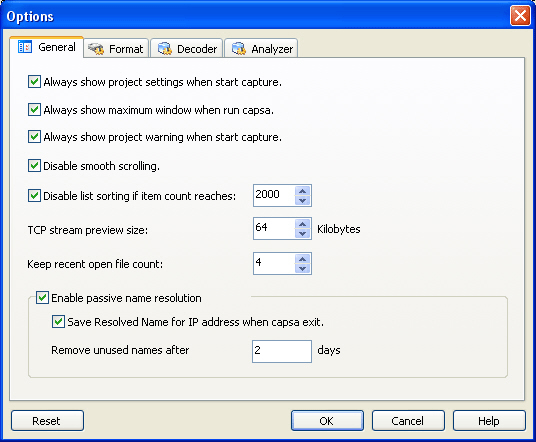
- Always show project settings when start capture.
If checked, Colasoft Capsa will always open the Project Settings dialog each time when you start a capture.
- Always show maximum window when run Capsa.
If unchecked, Colasoft Capsa will remember the last setting of project window size and apply to next time when you run Capsa again.
- Always show project warning when start capture.
If unchecked, Colasoft Capsa will not show the warning dialog when you start a new capture.
- Disable smooth scrolling.
Instant scrolling will be enabled in effect if you check this option.
- Disable list sorting if item count reaches:
The sorting function will be disabled when the listed items reach the limitation. The default count is 2000.
- TCP stream preview size:
You may customize the preview size of TCP stream, the default size is 64 KB. When a TCP stream goes beyond the limitation, only the contents within the defined size are shown in the Stream view.
- Keep recent open file count:
Define a limit for keeping recent open file.
- Enable passive name resolution
Enable passive name resolution, Colasoft Capsa will automatically
resolve the name of captured IP address.
- Save Resolved Name for IP address when Capsa exit.
By default, Colasoft Capsa will automatically save the resolved
names for IP addresses when you exit. If uncheck, the resolved names
will lose when you exit without saving them.
- Remove unused names after
Colasoft Capsa will remove the resolved names which unused more than 2
days in default.
- Reset
Click this button to restore the predefined settings.
|
|