|
In addition to build packet, Colasoft Packet Builder supports sending
packet too. This feature allows users to define many parameters than the
Send Packet feature in the
Packets view, such as define the interval between every packet
and the delay between loops.
Click the send
 button to open the Send Packet dialog.

- Adapter
Users can define a adapter for sending packet from if there are
more than one adapters in the PC. Clicks the "Select" button on
the right of "Adapter:" to open the Select Adapter dialog, chooses an
adapter from the combo box. The window under the combo box will display the
detailed information of the selected adapter.

- Bust Mode
Check this option, Colasoft Packet Builder will send packets one after
another without intermission. If you want to send packet as the
original delta time, please do not check this option.
- Loop Sending
Defines the repeated times of the sending execution, one time in
default. Please enter zero if you want to keep sending packets until pause or stop
it manually.
- Delay Between Loops
Appoints the interval between every loop if you defined the
loop times more than one. Colasoft Packet Builder will send without interval
between every loop in default.
- Total Packets
Displays the number of sending packets. For example, 4*5
means four packets are selected and each one will be sent five times.
So Colasoft Packet Builder totally sent out 20 packets.
- Packets Sent
Shows the number of packets have been sent successfully. Colasoft
Packet Builder will display the the packets sent unsuccessfully too
if there is a packet did not sent out.
- Process
The process bar simply presents an overview of the sending process
you are engaged in at the moment.
The Stop button will enable after start sending, let
you can pause/stop the execution. You can modify the parameters after click
the Stop button and then continue to send packets as the new
settings.
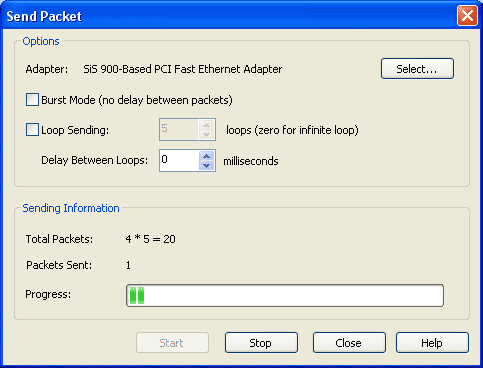
After sending packets complete, the Start button will be enabled while the Stop button
will be
disabled.
 |