 : Opens Add Matrix dialog box to create a new matrix.
 : Opens Modify Matrix dialog box to edit the selected matrix.
 : Deletes the selected matrix.
The matrix left pane contains three sections as follows:
There are four types of matrix by default:
You can edit default matrixes or create a new matrix by the icons on the toolbar:
: Opens Add Matrix dialog box to create a new matrix.: Opens Modify Matrix dialog box to edit the selected matrix.: Deletes the selected matrix.The Add Matrix dialog box appears as follows:
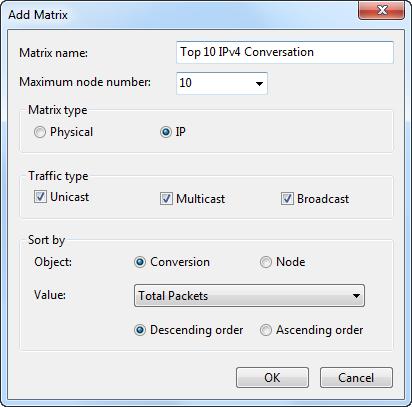
The Add Matrix dialog box includes items as follows:
This section lists the nodes which have been hidden by user. The number in the bracket on this section shows the number of hidden nodes.
To display user hidden nodes, right-click this section and choose Display Selected Nodes to display selected nodes or choose Display All Nodes to display all user hidden nodes. You can also right-click the matrix graph and choose Display All Hidden Nodes to display all user hidden nodes.
The section lists the nodes which have been temporarily hidden in the matrix because they do not match the settings of the matrix. The number in the bracket on the Invisible Nodes pane head shows the number of invisible nodes.
| Back |