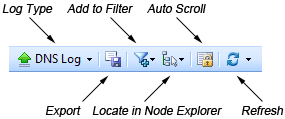
This page describes the toolbar and the context menu of the Log tab.
The following table lists all the items on the toolbar:
| Log Type | Click the little triangle to choose a log type in the list and only this type will be listed. Simply click the button will hide the Log Type pane, and click it again to bring it back. |
| Export | Click to export all items in conversation list as a *.txt format file to your disk. |
| Add to Filter | Click to create a filter based on selected item. |
| Locate in Node Explorer | Click to locate the highlight node address in the Node Explorer window. |
| Auto Scroll | The log list will display the newest record always if check this button. But when you select an item in the view, this button will stop execution until you check it again. |
| Refresh | Click to refresh the log list or set the refresh options. |
| Log Record Counter | Shows the number of logs in the list. |
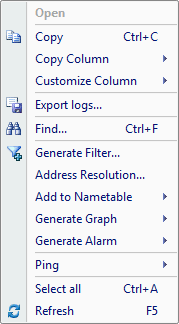
The following table lists all the items in the menu of the Log tab:
| Open | Opens the highlighted URL. Only clickable in HTTP Log Type. |
| Copy | Copies the selection in original format to the clipboard. |
| Copy Column | Copies the selected column in original format to the clipboard. |
| Customize Column | Shows/hides columns or changes the position of columns. |
| Export Logs | Saves all log items to your disk as a *.txt format file. |
| Find... | Finds an item in the tab. |
| Make Filter... | Opens a new dialog to create a filter on the basis of the selection. |
| Address Resolve... | Resolves the host name of your selected IP address. |
| Add to Name Table | Add an alias for the selected node to the Name Table. |
| Make Graph | Generates a graph in the Dashboard tab based on the selected item. |
| Make Alarm | Generates an alarm item based on the selected item. |
| Locate in Node Explorer | Locates the current node in the Node Explorer window. |
| Ping | Invokes the build-in Ping Tool. |
| Packet Player | Invokes the build-in tool Packet Player. |
| Packet Builder | Invokes the build-in tool Packet Builder. |
| MAC Scanner | Invokes the build-in tool MAC Scanner. |
| Select All | Selects all items in the list. |
| Refresh | Refreshes the current tab. |
|
Back |
| Copyright © 2001 - 2010 Colasoft. All rights reserved. |