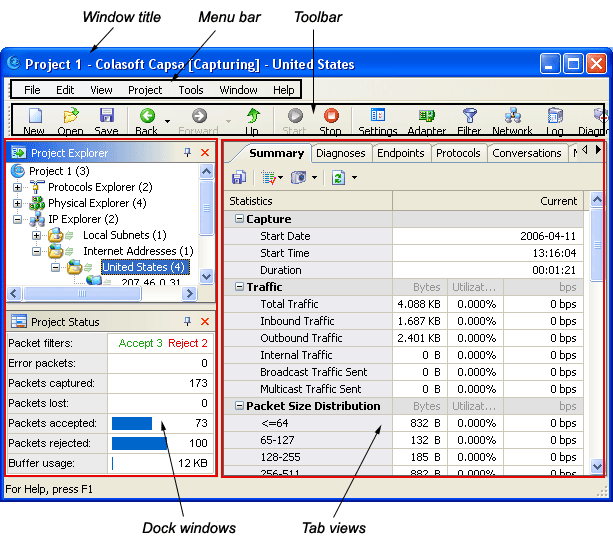
The project window of Colasoft Capsa is composed of the following components:
- Window title
The window title shows the product name and the active project's name.
- Menu bar
The menu bar provides many useful commands in Colasoft Capsa.
- Toolbar
The toolbar contains the buttons for the most commonly used menu commands, you can add or remove the toolbar buttons.
- Start Page
The start page is the first screen you can see when you begin a new capture, which offers some common project operations.
- Dock windows
At the left section of user interface by default, the dock windows include Project Explorer and Project Status . The project explorer dock window lists all network nodes and protocol nodes, letting you quickly select a target to view related information in tab views. The project status dock window offers the overview information of project.
- Tab views
Including Summary, Diagnoses, Endpoints, Protocols, Conversations, Packets,
Matrix, Logs, Graphs and Reports view, each presenting different information of the same node selected from the project explorer dock window.
More descriptions about these components can be found in the sections below.
 |