 after the textbox to open Log File Settings dialog as figure below:
Email Log Settings shows only when the current analysis profile loaded the Email analysis module.
You can read Analysis Profile to learn how to open this settings window.
The Email log settings has the following items:
Click the Log Buffer Size textbox to input a number as log buffer size as log buffer size, 2048 (KB) by default.
Email logs will not be stored to your disk by default. If you need to save them, click after the textbox to open Log File Settings dialog as figure below:
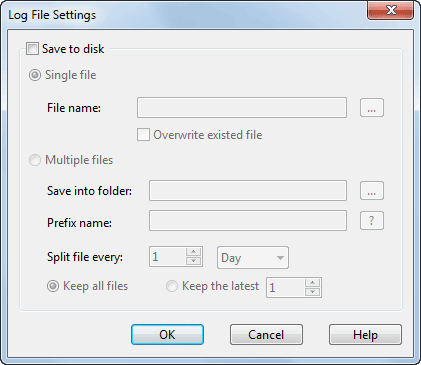
You may choose to save logs to your disk in a single file or multiple files.
|
Back |
| Copyright © 2001 - 2010 Colasoft. All rights reserved. |