
The Menu button is on the top-left corner of a project window.
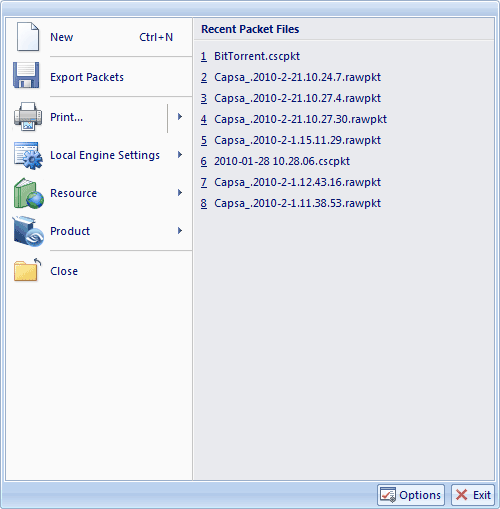
Click it, and the Menu appears as figure below:
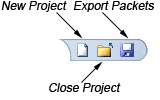
There are three quick access icons beside the Menu button:
| Command | Shortcut | Description |
| New | Ctrl+N | Creates a new project. |
| Export Packets | Click to save all the packets in the buffer to disk. | |
| Print... | Prints the current page or sets print configurations. | |
| Local Engine Settings | Customize the protocols, display format and report settings. | |
| Resource | Offers product information and resources. | |
| Product | Provides product information. | |
| Close | Closes the current project. | |
| Recent Files | A list of recently opened packet files, with the most recently opened listed first. You can select a file from this list to open it. | |
| Options | Opens the System Options dialog. | |
| Exit | Quits Colasoft Capsa. |
| Command | Shortcut | Description |
| Ctrl+P | Prints the current window in a format appropriate to its type. | |
| Print Settings | Configures printer functions in the Print Setup dialog. | |
| Print Preview | Preview the print page. |
| Command | Shortcut | Description |
| Customize Protocol | Configures and customizes the network protocols. | |
| Format | Sets the display format. | |
| Report | Configures the web page contents of the Report. |
| Command | Shortcut | Description |
| Colasoft Home Page | Opens Colasoft home page. | |
| Network Analysis Forum | Opens the technical forum, where you can get help and learn more skills on network analysis. |
| Command | Shortcut | Description |
| License Key | Renews your license key. | |
| Activate | Enters license key and activates Colasoft Capsa. | |
| Register | Registers at Colasoft official website to get timely customer services and product information. | |
| Update | Checks new versions. | |
| About | Opens the About dialog where you can find the version, copyright and license information of the product. |
|
Back |
| Copyright © 2001 - 2010 Colasoft. All rights reserved. |