 Upper Pane (IP Endpoint List)
 Lower Pane (Relating tabs)
Endpoints are all the objects communicating in the network. Capsa divides all nodes by physical address and IP address. This tab provides a great number of statistics on IP endpoints to help you find useful information on IP addresses. This tab contains the following components:
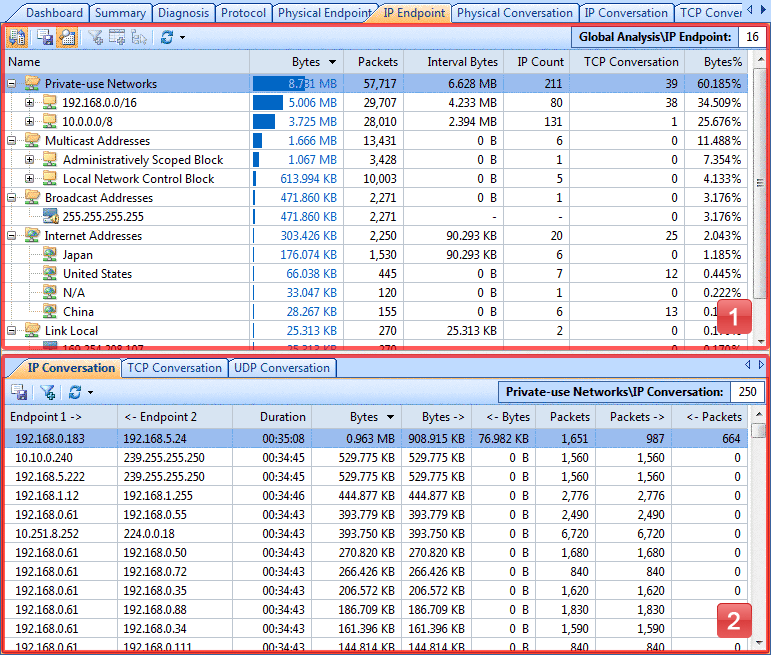
 The IP Endpoint tab will be invisible if you select any MAC address item in Physical Explorer of the Node Explorer window.
Endpoints are displayed in a hierarchical structure. You can click any column header to sort the list to check if there is any abnormal traffic.
The IP Endpoint List contains the following items:
The following table lists all the components on the toolbar:
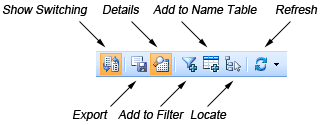
| Show Switching | Click to switch list layout between hierarchical and tiled style. |
| Export | Clicks to export all items in the list to a *.txt format file to disk. |
| Details | Click to show or hide the lower pane. |
| Add to Filter | Click to open the Packet Filter dialog box to make a new filter based on the selection in this pane. |
| Add to Name Table | Click to add an alias for the selected node to the Name Table. |
| Locate | Click to locate the current node in the Node Explorer window. |
| Refresh | Click to refresh the list or set the refresh options. |
| Node Counter | Shows the number of all IP endpoints in the list. |
Right-click a column header, you can select more columns to show in the list. Choose Default to get showing columns back to default.
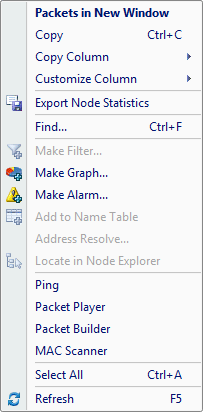
The following table lists all the items in the menu of this list:
| Packets in New Window | Sends the packets relating to the selected node to a new packet decode window. |
| Copy | Copies the selection in original format to the clipboard. |
| Copy Column | Copies the selected column in original format to the clipboard. |
| Customize Column | Shows/hides columns or changes the position of columns. |
| Export Node Statistics | Saves all of the IP endpoint statistics to disk as a *.txt format file. |
| Find... | Finds an item in the list. |
| Make Filter... | Opens a new dialog box to make a new filter on the basis of the selection. |
| Make Graph... | Generates a graph in the Dashboard tab based on the selected item. |
| Make Alarm... | Generates an alarm item based on the selected item. |
| Add to Name Table | Add an alias for the selected node to the Name Table. |
| Address Resolve... | Resolves the host name of your selected address item. |
| Locate in Node Explorer | Locates the current node in the Node Explorer window. |
| Ping | Invokes the build-in Ping Tool. |
| Packet Player | Invokes the build-in tool Packet Player. |
| Packet Builder | Invokes the build-in tool Packet Builder. |
| MAC Scanner | Invokes the build-in tool MAC Scanner. |
| Select All | Selects all items in the list. |
| Refresh | Refreshes the current list. |
There are three tabs show in the lower pane when you selected any protocol item or IP address item in the Node Explorer window: IP Conversation, TCP Conversation and UDP Conversation. Your selection in the Explorer window and the selection in the protocol list will be like filters to get more small items in the bottom tabs. These tabs will save your time and clicks to find the statistics you need.
Read the IP Conversation, TCP Conversation and UDP Conversation to learn detailed descriptions of these tabs.
| Back |
| Copyright © 2001 - 2011 Colasoft. All rights reserved. |