Start Page
The Start Page is the first screen you see when starting the program, which guides you to start an analysis project step by step and appears as below.
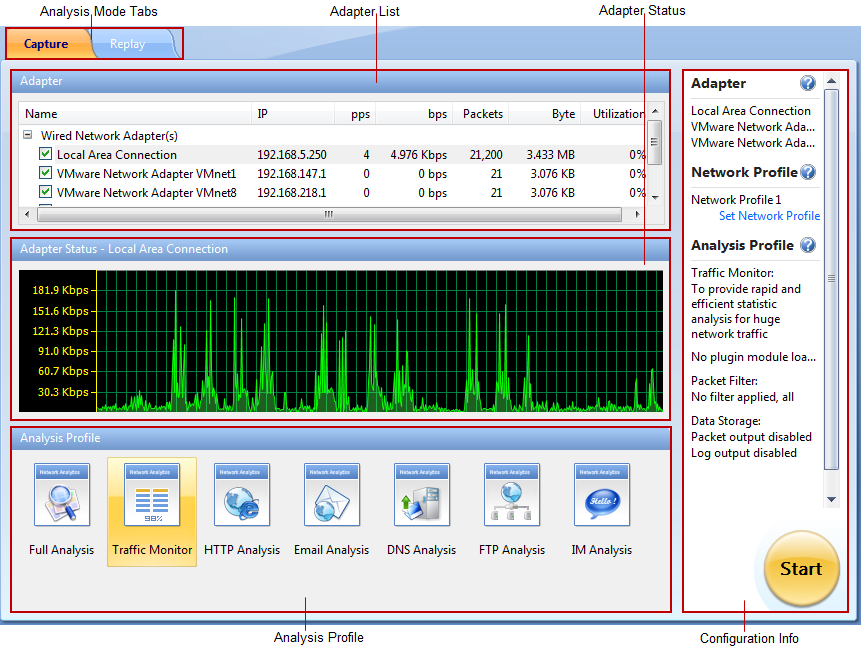
The Start Page includes following parts.
- Analysis Mode tabs: Includes Capture tab and Replay tab. The Capture tab is for capturing live network data. The Replay tab is for replaying captured network data (See Replaying captured packets for details).
- Adapter List section: Lists all available network adapters.
- Adapter Status section: Shows the real-time traffic status of the adapter selected on the Adapter List section.
- Analysis Profile section: Lists all available analysis profiles (See Analysis Profile for details).
- Configuration Info section: Displays the configuration info of the analysis project and includes following parts:
- Adapter: Shows the adapter selected on the Adapter List section.
- Network Profile: Displays the selected network profile. To edit or change a network profile, click Set Network Profile on the right side. See Network Profile for details.
- Analysis Profile: Shows some details of the analysis profile selected on the Analysis Profile section, including loaded analysis modules, packet filters, and data storage information.
You can click  on the right side to get related tips and introductions.
 For Capsa Professional, all wireless network adapters will be taken as wired network adapters.