Creating and Editing Alarms
Colasoft Capsa allows you create new alarms from any node in the Node Explorer window and any item in all tabs of the Main View. A great many of options and thresholds enable you create useful and powerful alarms. You can also open Top 10 statistics in an alarm. This page describes the following topics:
Make Alarm
To open the Make Alarm dialog, do any of the following ways:
- In Node Explorer window: click
 on the toolbar or right-click a node to open the context menu, then choose Make Alarm...
- In Main View: Right-click a item to open the context menu, then choose Make Alarm... (if clickable)
The Make Alarm dialog has the following parts:
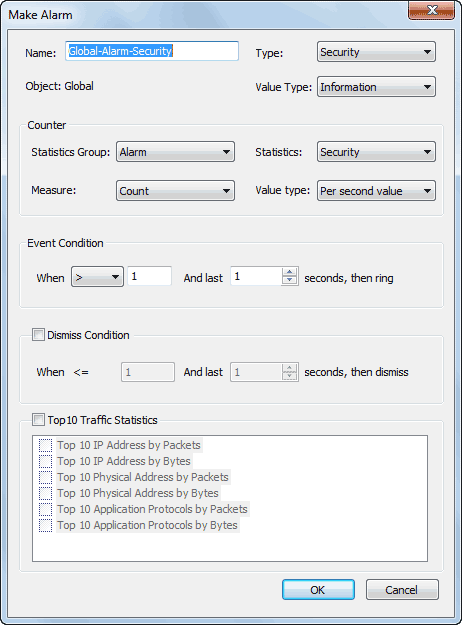
- General Information
Sets the general information of the alarm. Including name, type, object and value type.
- Counter
Sets the statistic item of the alarm and measurement of the alarm. Different alarm object may have different statistics group.
- Event Condition
Sets the trigger threshold of the alarm.
- Dismiss Condition
Sets the threshold that under what condition this alarm will be dismissed.
- Top 10 Traffic Stat
This functionality enabled, the alarm will make statistics on the chosen top 10s. Recording these top ten statistics are useful when the alarm triggered. Different alarm object may have different traffic statistic items.
 Each alarm has its unique name, you cannot create an alarm with a name that already exists in the list.
Edit Alarm
To edit an alarm, do any of the following ways:
- Click the Alarm Setting icon on the Analysis tab of the Ribbon to open the Network Profile dialog. Select an alarm, then click the Properties... button on the right side of the dialog.
- Double-click an alarm item in the Alarm List of the Alarm Explorer window to open the Network Profile dialog. Then follow the steps of the fist way.
- Click the Property icon on the toolbar of the Alarm Explorer window to open the Network Profile dialog. Then follow the steps of the first way.
The Edit Alarm dialog appears as follows:
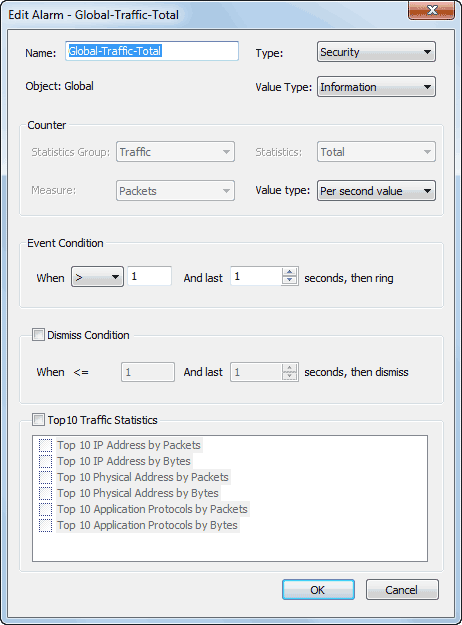
You can only change Alarm Type, Severity, Value Type, Trigger Condition and Disable Condition in Alarm Settings dialog. Other options are unalterable. If you need to modify an alarm, please delete it and create a new one.