|
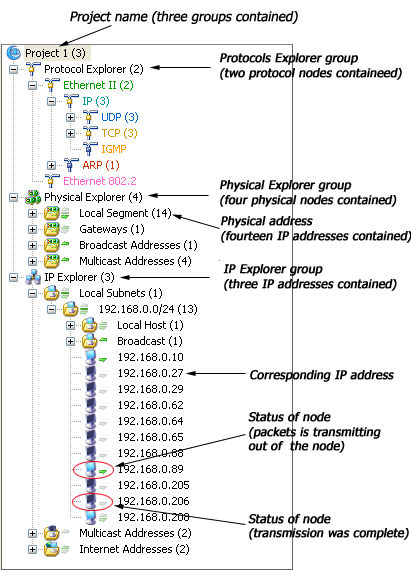
The Project Explorer dock window is on the left section of project window by default, which allows you to
view the current status of each node and quickly switch among global statistics and the details of specific network nodes; you can not see it if no project is created or opened. There are three groups in the project explorer: Protocol
Explorer, Physical Explorer and IP Explorer.
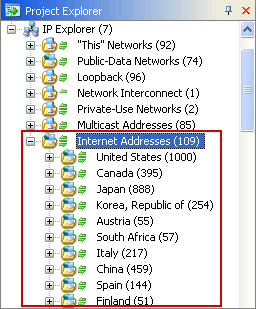
In the Physical Explorer and IP Explorer group, the arrows on the right of the each node’s icon indicate the current status of the node. The node's icon and the arrows will green when the node transmitting packets and become to grey when transmission complete. The upper arrow indicates packets transmitted in, the below one indicates packets transmitted out from the node. The number in bracket indicates the amount of the sub-nodes. Colasoft Capsa can list up to 1000 sub-nodes. If a node has more than 1000 sub-nodes, e.g. 2000, then the node will be showed as xxx (2000) when collapsed and xxx (1000/2000) when expanded. Furthermore, the captured addresses will be grouped under countries in the Internet Addresses of IP Explorer group if you check the Group IP address by its country in the General page of Project Settings dialog.
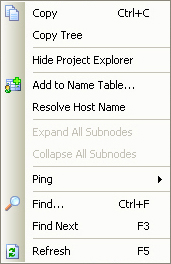
The Project Explorer dock window and the tab views on the right section of project window are consistent in displaying data. When you select a node in this dock window, the data displayed in tab views changes accordingly. The figure below is the right-click context menu of this dock window. In addition to the common context commands, there is special command in this context menu - Ping. The Ping command used to invoke the build-in ping tool to ping the IP address of the selected node in the Physical Explorer and IP Explorer group. Please see "Ping tool" for more details.
The name of listed hosts can be resolved manually with the Resolve Host Name command from the context menu with a right click on the display. It is also allowed to make alias and change text color from this dock window, please see "Name Table" for more information. |