|
The Protocols view displays the information of protocols used by network communications. The bottom sub-views offer the packet and
conversation details of the active protocol, which can also be viewed in a new window when you double click on the protocol.
You may use the combo box to select a display type.
- All
Displays all hierarchical protocols.
- Physical
Displays protocols based on Ethernet II. For example, ARP, IP, IPv6,
IPX, and so on.
- IP
Displays protocols based on IP protocol. For example, HTTP, MSN,
DNS, NetBIOS, and so on.
Notes: The TCP - Other and UDP - Other
are the protocols Colasoft Capsa did not support yet now. When the Show Details button  pressed down, you can see the packets related to the current protocol shown in the lower sub-view.
You may also double click on a row to open an Protocol Details window.
Click on the + (plus) or - (minus) signs at the left margin to expand or collapse individual items of the display. pressed down, you can see the packets related to the current protocol shown in the lower sub-view.
You may also double click on a row to open an Protocol Details window.
Click on the + (plus) or - (minus) signs at the left margin to expand or collapse individual items of the display.
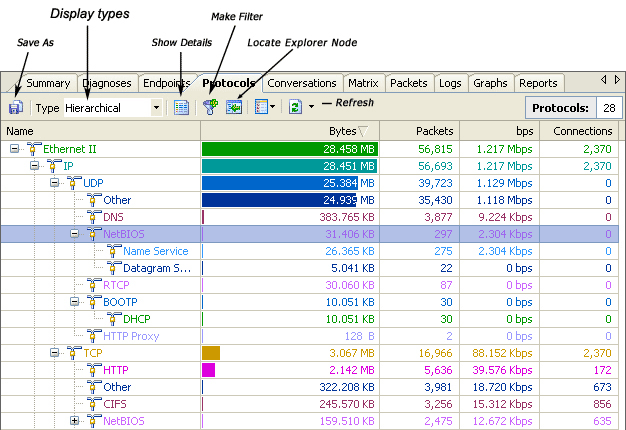 In addition to the common context commands as other tab views, this view also has the following special commands:
| Command | Description |
| Save Protocol Statistics... | Saves the selected protocol and its statistics to a file. |
| Expand All Subnodes | Expands the hierarchical list of protocols. |
| Collapse All Subnodes | Collapses the hierarchical list of protocols. |
|