
24x7 Network Monitoring with Colasoft Capsa
Sometimes network analysis requires long time network monitoring and must be based on the baseline of normal network. Long time network monitoring is an essential function of network analyzer, as a delicate work, network analysis always requires us to view the original packets and analyze them. However, not all the network failures can be fixed in a very short period if without an efficient way.
Colasoft Capsa supports 24x7 long-time network monitoring. It is able to capture all packets and save those packets files to local hard disk in various manners. We need not to stay with the computer all the time any more to stay close to network monitoring. When it needs to view history network information, we just need to import the saved packet files into Colasoft Capsa and then we can do the post-event analysis work.
First of all we need to configure Capsa to auto save the captured packets to packet files:
- Double-click the analysis profile icon you will use on the Start Page;
- Click Next on the bottom of the Modify Analysis Profile dialog box;
- Click the Packet Storage item on the left panel of the shown Analysis Profile Options dialog box;
We will see the Packet Storage property page like figure below:
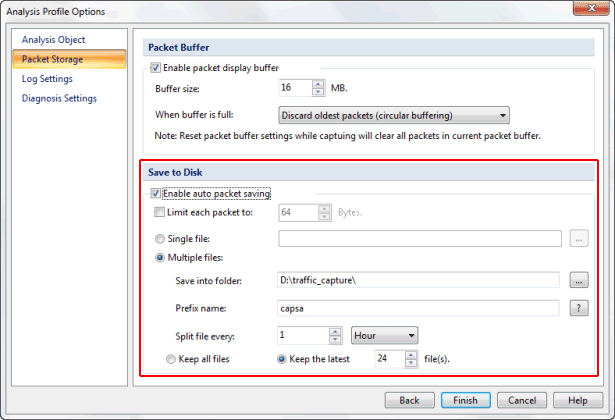
Figure 1: Packet Storage Settings
We can save the packet file in 2 manners: Single File and Multiple Files, see Figure 2 and Figure 3.

Figure 2: Save Packet File to Single File
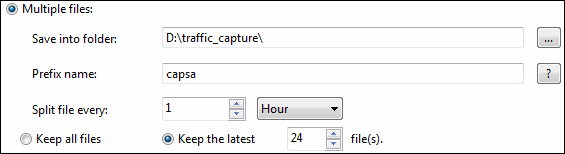
Figure 3: Save Packet File into Multiple files
If we choose to save captured packets in multiple files, we may set the split files options (month, day, hour, minute, KB or MB), which make it easy to manage those packet files.
With this function of Colasoft Capsa, we can:
- Capture all packets in a long period;
- Save captured packets for post analysis;
- Know network status of a comparatively long period;
- Find out the bottleneck and possible vulnerabilities in the network.