Colasoft is dedicated in providing easy-to-use network analyzer, packet sniffer & protocol analyzer

Home > Colasoft MAC Scanner
MAC Scanner Pro - Scan MAC Address in Seconds
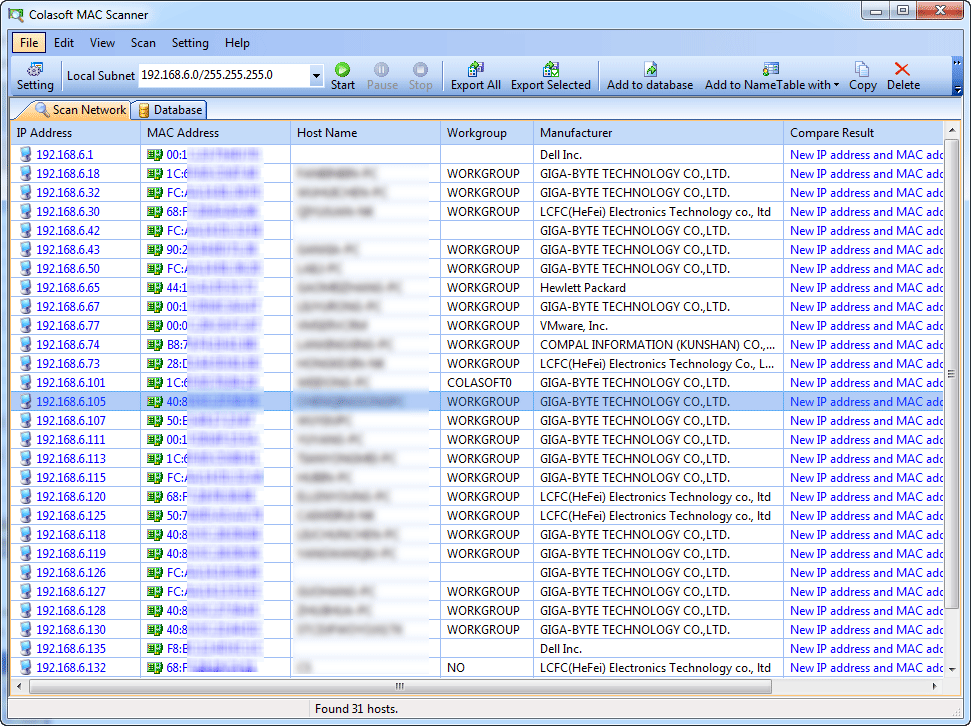
  • List MAC addresses and IP addresses in your local subnet in seconds. Network administration will never become efficient before you know exactly who is the user and where is the computer. MAC Scanner Pro will do it for you.
  • Overview

    For Non-commercial Users - Free

    Colasoft MAC Scanner Colasoft MAC Scanner Free is an edition for personal use and no-commercial use. This edition satisfies simple MAC address scan and IP address scan needs.

    For Commercial Users - Pro ver 2.2

    Colasoft MAC Scanner Pro Colasoft MAC Scanner Pro is an edition for business users and enterprise users. MAC Scanner Pro has more advanced features than the free version.(Learn more..)

    How Colasoft MAC Scanner Works

    Colasoft MAC Scanner will send out ARP (Address Resolution Protocol) queries to the specified subnet and listen to the responses from all the hosts in the subnet, then list the MAC addresses and IP address in pairs.

    Comparison of the Two Different Versions


    Colasoft MAC Scanner Free

    Colasoft MAC Scanner Pro

    Price

    It's Free

    $99.00
    (Buy Now)

    Features Scan MAC addresses and IP addresses
    Save Scan Results into database for future reference and network maintenance.
    Add attributes (such as users name and physical location of the host) to scan results and save in database.
    Automatically compares new MAC scan results with database records and notifies difference and new records (illegal access).
    Print and Print Review MAC Scan Results
    Export scan results as Colasoft Capsa Name Table file
    Add to Colasoft Capsa Name Table
    Download   Download Free Trial


    Colasoft MAC Scanner FAQs

    I wanna scan a IP range out of my allocated IP scope, the program just blocked me from inputing any thing. It just displays the only IP range as my pc is using.

    A: The mac scanner is binded to the IP address you have configured on your NIC. For example: you are accessing the network by IP address 192.168.1.2/24, then the mac scanner will read the information from your NIC and allow you scan only the IP range 192.168.1.0/24.

    I have tried the MAC Scanner PRO. It is good to be customizable. I can now input the IP range I would like to scan, but, Hey nothing appears in the frame. I can ping the IP address in that range but nothing, it's just nothing displayed after a scan.

    A: The Mac scanner works by ARP protocol. As we know, ARP is a protocol without IP header which means it can not go across layer 3 devices such as router(gateway), or L3 switch. Also we know that communication between different IP range (networks) has to be handled by the gateway. So here is the result --- MAC scanner can not work over different networks. This is technically not feasible rather than a drawback of the program itself.

    Sometimes I saw multiple IP addresses listed under one single MAC address. How does this happen?

    A: Acturally this happens all the times. Normally users can configure more than one IP address on one NIC but one IP address can only be allocated to one NIC. For example, you can add many IP address to specify yourself and even more than one gateway in Microsoft Windows OS, advanced TCP/IP settings.

    Another scenaro, if there any virtual machine hosted in your system, and they are bridged to the physical NIC, They will consequently be exposed to the network, and some virtual machine use multiple IP address over a single MAC address.

    I had saw a lot of MAC addresses listed in the MAC Scanner, but never ever once I saw any mac begin with 1, or 2, or any number not 0. Hey this is weird.

    A: There are mac addresses begin with F or other values. They are broadcast or multicast, and only appears as the destination addresses. Since the mac scanner is designed to find out the active IP addresses and corresponding mac addresses in a broadcast domain, each of the mac listed should belongs to a physical existing device. Only the mac address which can be used as a source to send data can be listed.

    I tried the "find" button but got the notification "the next specified text was not found". What is this for?

    A: After scanned a hundreds of hosts, there might be more entries listed in the frame if there are multi IP hosted in one mac. It would be a huge and dazzling work to find the right information from them. The "find" is just works as a match tool, It will find all the matched context you inputed for you. Notice, it only works after scan. I think that why you have never find anything match your inputed condition.

    Is there any way I can save the data after scanned the network, and read them when I need to compare the difference upon time elapse? And sometimes I need to combine data from different networks so that I can see have a global view over my entire intranet.

    A: It is not supported to export data into rereadable file format in the version 1.0. However, the Mac scanner 2.0 Pro can export data and then import them, and this offered a more powerful interface for data management.

    I was wondering why there is no information provided in the manufacturer collum? Sometimes there are manufacturers like IBM, Linksys, Cisco, H3C, but sometimes there is just, nothing.

    A: The first 24bit of each NIC MAC address is specifically assigned to different manufacturers. The MAC Scanner uses the database of first 24bits allocation to specify the manufacturer of each NIC. However The allocation updates upon times, new manufacturers appeal for new values. We can only guarantee that we update the database as soon as we can but there is a release schedual of each product. Please understand it is not possible to keep the data synchronized all the time.

    I've tried to scan the network. But it seems refused to add in hosts more thant 100. How rediculous. Is it the limitation of free tool?

    A: Actually, the utmost value of MAC Scanner is 100. The reason is simple: in a broadcast domain, there should not be hosts more than 100, or the switch or hub, is going to be jamed with broadcast traffic.

    And that is why vlan been used in the modern network designations.

    Blog | Terms of Use | Privacy Statement | Feedback | Contacts | Links | Sitemap Pre-Sales Toll Free: 888-467-2634 (USA)
    Copyright © 2001 - 2009 Colasoft Co., Ltd. All rights reserved.
    Colasoft, Capsa and Colasoft logos are registered trademarks of Colasoft Co., Ltd. Sniffer is a registered trademark of Network General Corporation. All other names are trademarks or registered trademarks of their respective owners.