
Analyze Broadcast Traffic with Colasoft Capsa
What's broadcast traffic?
In Ethernet, all communications are based on broadcast. By default, every host must process all broadcast packets in the network. The traffic that broadcast packets occupy is called broadcast traffic. Excessive broadcast traffic may lead to network performance depreciation, or even cause network failures such as slow network and intermittence.
The network will be less influenced if broadcast traffic is small. However, the influence of broadcast packets to the network cannot be eliminated. In Ethernet, there are a lot of protocols such as ARP, RARP, NETBEUI, SMB, DHCP, RIP, SAP, and IPX to some extent work in broadcast mode. Normally, broadcast traffic should not exceed 20% of the total traffic. To avoid broadcast storm and other network failures, network administrators should regularly check broadcast traffic in the network.
Check broadcast traffic in network
Our network is a 100M Ethernet. We can have a real-time Broadcast Traffic statistics in the Summary tab which provides several types of statistics (Figure 1).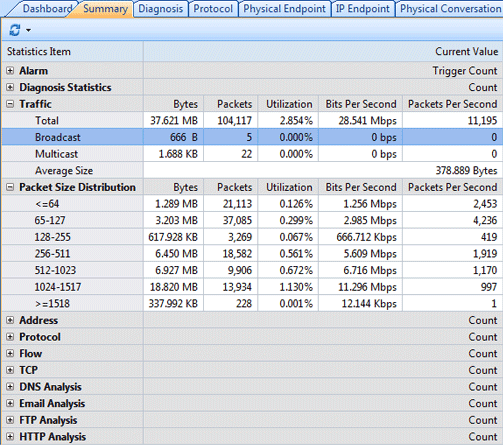
Figure 1: Broadcast traffic summary statistics in the Summary tab
As we can see from the figure above, there are only 5 broadcast packets. It indicates that broadcast in network is normal.
If you want view specific application of broadcast traffic, you can proceed from the Node Explorer window: Physical Explorer -> Broadcast Addresses, and open the Packet tab in the Main View. As shown in figure 2, all the packets in the Packet tab are broadcast packets. The packet we select is NBNS (NetBIOS Name Service) protocol packet. It means that there is NetBIOS name service querying in the network. In addition, we can locate specific host by Source, which facilitate us in network troubleshooting when failure concerning broadcast happens.
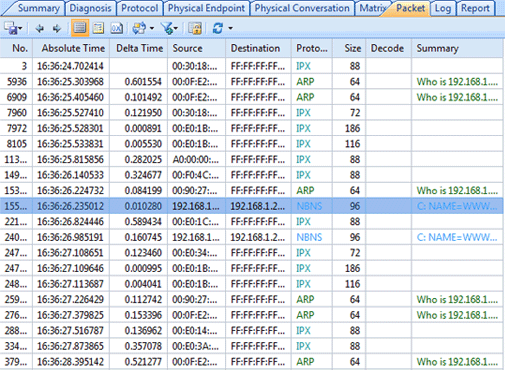
Figure 2: View Application of Broadcast Traffic
With Colasoft Capsa, we can not only effectively monitor broadcast traffic in the network, avoid broadcast storm, but also quickly locate and troubleshoot network failures, so as to guarantee sound network operation.