
How to Detect the Network Malfunction Via the End-point View
Brief introduction of the IP Endpoint tab in Colasoft Capsa
There are two tabs concerning endpoint statistics in Capsa: the Physical Endpoint tab and the IP Endpoint tab. Users can detect the IP/MAC endpoint in the largest traffic in a short time by the endpoint analytics. And also, The system supply clear statistics of traffic ranking(Top 5 IP endpoint under HTTP protocol).
In these endpoint tabs, we can see the specific traffic situation clearly of all the hosts (including a network segment, a Mac address, and a IP address) in the currently network. Like the hosts with the largest total traffic, hosts that send/receive the largest traffic, hosts that send/receive the most packets, etc.
According to this information, we can confirm that if there are Broadcast / multicast storm, and help users detecting the network malfunctions about network slow, network disconnect, worm attack, DOS attack, and all the malfunctions besides.
Application case study
Once we meet the network malfunction or attack, the most important thing we should pay attention to is the currently total network traffic, sent/received traffic, network connection etc, to get a clear direction to find the problem. And, all of this statistics are included in the endpoint tabs in Colasoft Capsa (Figure 1):
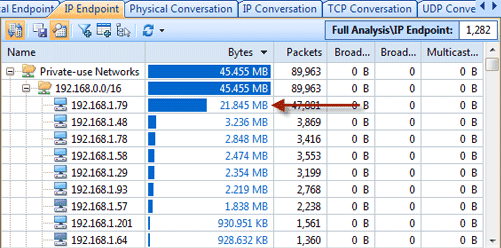
Figure 1: the IP Endpoint tab shows the first IP address with the biggest traffic is abnormal
In figure 1 we can make a compositor on the total traffic, network connection and other related information, to find and locate the host with largest traffic or most connections in the network. For example, at present, the host with the largest network connection is , we can locate the host, then check the related connection information(figure 2):
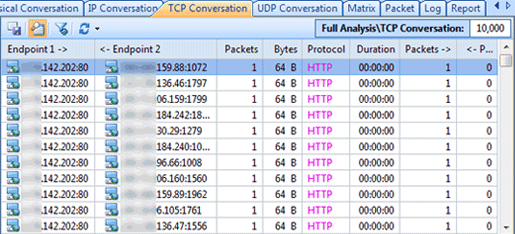
Figure 2: the TCP Conversation tab shows the IP tried to initiate connections with remote addresses
The connection information shown as the figure 2, we can know that has set up a large amount of TCP connection with other hosts, and the destination address and destination address are indefinite, and many of the state is to connect client requests synchronization. Next, check the TCP packets, we can check them out in the Summary tab as figure 3 below:
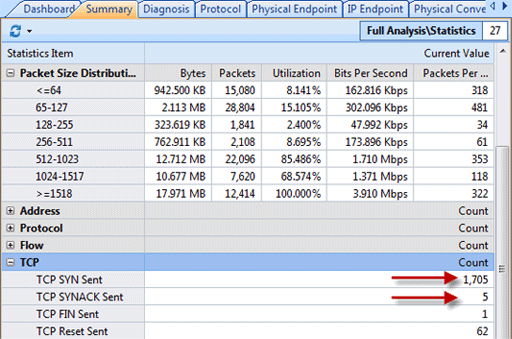
From TCP statistical data on the Summary view, we can know that there are lots of TCP synchronization packets, but TCP FIN packets and TCP Reset packets are so few, and this is deviant in the network.