
Powerful Protocol Analyzer
Analyze protocols in the Protocol tab
By analyzing network protocol distribution and learning what protocols are being used in the network, we can quickly find out what host is doing what activity. For example, when we see RSTP protocol in the network, we can quickly determine that certain host(s) in the current network are applying online stream media service. Users can clearly understand protocols use in the Protocol tab of Colasoft Capsa, as shown in Figure 1.
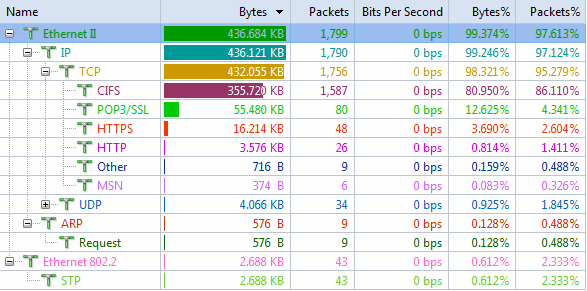
Figure 1: Analyze Protocols in the Protocol tab
From the above figure we can see an overall display of protocols. Users can analyze detailed information all protocols in the network, such as traffic, packets, connections etc.
Analyze protocols in the Node Explorer window
We can also analyze protocols distribution in the Node Explorer window. After expanding the Protocol Explorer node we can analyze all protocols in the network but without detailed information such as traffic, packets etc. This is because the Protocol Explorer node mainly serves for fast switching and display filtering from those protocols in order to view corresponding data in the tabs of the Main View.
By comparing these two figures we can find protocols distribution in those two parts are identical.
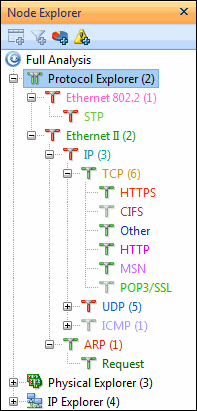
Figure 2: View Protocols in the Node Explorer window