
Colasoft Packet Builder
Colasoft Packet Builder enables creating custom network packets; users can use this tool to check their network protection against attacks and intruders. Colasoft Packet Builder includes a very powerful editing feature. Besides common HEX editing raw data, it features a Decoding Editor allowing users to edit specific protocol field values much easier.
Users are also able to edit decoding information in two editors - Decode Editor and Hex Editor. Users can select one from the provided templates Ethernet Packet, ARP Packet, IP Packet, TCP Packet and UDP Packet, and change the parameters in the decoder editor, hexadecimal editor or ASCII editor to create packets. Any changes will be immediately displayed in the other two windows. In addition to building packets,Colasoft Packet Builder also supports saving packets to packet files and sending packets to network.
Download a free network analyzer to monitor, analyze and troubleshoot your network.
| File Size: 61.6 MB | Release Date: 08/07/2024 |
| Latest Version: 2.2 | Requirements: Windows 2000/XP/2003/Vista/7/8/10/11 |
There are three views in the Packet Builder, they are Packet List, Decode Editor, and Hex Editor.
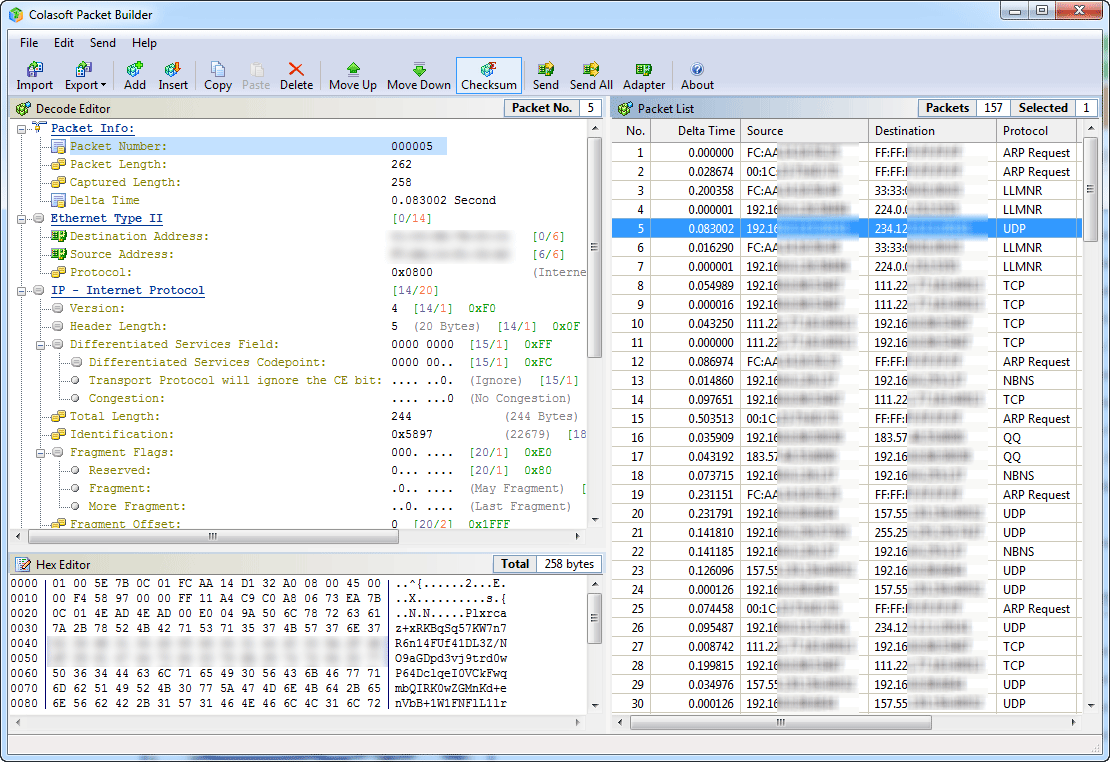
The Packet List displays all constructed packets, when selecting one or more packets in Packet List, the first highlighted packet will displays in both Decode Editor and Hex Editor for editing.
In the Hex Editor, the data of the packet is represented as hexadecimal values and ASCII characters, nonprintable characters are represented by a dot "." in the ASCII part. Users can either edit the hexadecimal values or the ASCII characters.
The Decode Editor is a unique feature in Colasoft Packet Builder, editing in decode editor allows to edit packets without remembering value length, byte order and offsets, simply select a field, and change value in the edit box.
Creating packet
- Users can import a existing packet trace file created by sniffer software such as Colasoft Capsa, Wireshark, Network General Sniffer and WildPackets EtherPeek/OmniPeek etc.
- Users can use the Add or Insert Packet command in Edit menu or Toolbar to create a new packet, Colasoft Packet Builder provides several common-used packet format- Ethernet Packet, ARP Packet, IP Packet, TCP Packet and UDP Packet.
- If Colasoft Capsa has been installed, users can also send packets in Capsa to Packet Builder on the fly.
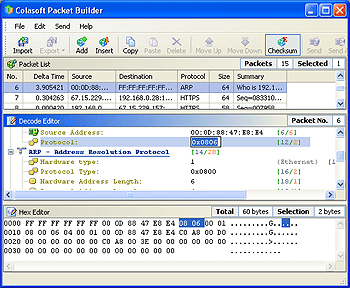
Colasoft Packet Builder supports auto-checksum feature, users can enable this feature by check the Checksum button in toolbar, Packet Builder will calculates the IP, TCP, ICMP, and UDP checksum automatically every time when changing packet data (see the below figure).
Sending packet
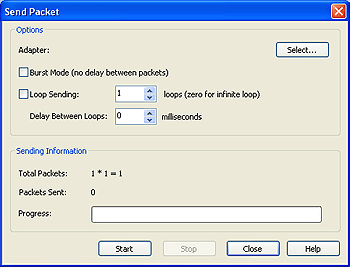
Colasoft Packet Builder has a built-in sending packets feature, allows to send constructed packet to wire directly without third part packet sending software. Users can also control how Colasoft Packet Builder send the packets, such as the interval between every packets, loop times and the delay time between loops (see the below figure).
 Download Colasoft Packet Builder 2.2 Help